
If GSA SER submits links but verifies few of them, inspect a small sample of those submissions before changing lists or increasing threads. Find out whether each target accepted the content, whether any account or email step completed, and whether the expected page contains your link. The gap tells you where to investigate; the submitted count alone does not tell you what failed.
A January 2025 GSA forum question describes this exact frustration: successful submissions without the expected verified output. It establishes a real troubleshooting question, not a diagnosis that applies to every project.[3] This guide focuses on that gap, rather than general machine-speed tuning.
Read the right outcome
LPM means links per minute; VPM means verified links per minute. They help you follow activity, but a busy submission log is not proof that the resulting links are live. GSA describes checking submitted links and monitoring whether they remain available.[1] Keep the submission and verification records beside the rate counters.
A link found now may disappear later. That is a persistence question. Whether its page is indexed, whether your destination ranks, and whether visitors arrive are separate questions. Do not turn a VPM change into a ranking conclusion, or divide unrelated counters from different observation periods and call the result a success rate.
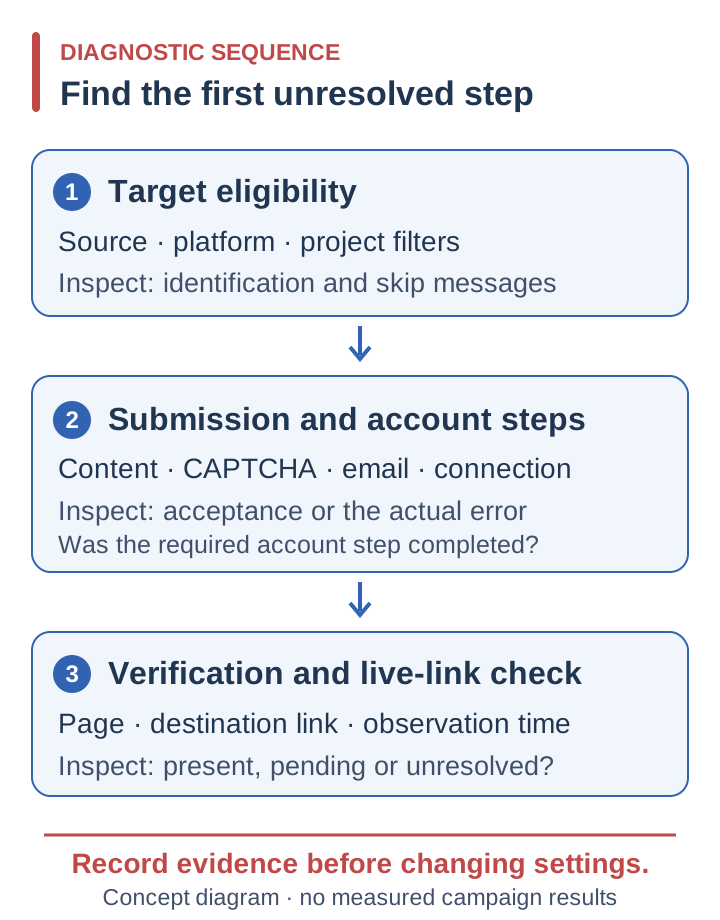
Start with evidence you can inspect
Choose a manageable sample from one project and note the target URL, engine, latest relevant log message and time. Include more than the single worst failure. Group similar messages so a recurring problem becomes visible. GSA documents separate controls for platforms, filters, content, email registration, proxies and CAPTCHA services; those are useful categories for investigation, not interchangeable fixes.[1]
| Symptom | Evidence to inspect | Next check |
|---|---|---|
| Targets rarely reach submission | Engine identification, rejection or skip messages | Target source, selected platforms and project filters |
| Registration or posting stalls | Account, content, CAPTCHA or email errors | The specific incomplete step, not a new target batch |
| Requests repeatedly fail | Timeouts, connection failures or access-denied responses | Reachability and proxy behavior on affected targets |
| Submitted, but link not found | Expected page, publication state and destination URL | Moderation, rejected content or verification timing |
| Previously verified link disappears | Earlier record versus the current page | Page removal, link removal or temporary access failure |
Separate target eligibility from posting failures
First confirm that the intended target files are available to the project. Then compare their platforms with your selected engines and filters. A recognised platform can still be unsuitable for your project. Keep deliberate quality restrictions in place while diagnosing; relaxing every filter might increase activity while defeating the reason you set them.
Next inspect the step that actually failed. Missing required content, a rejected account, an unfinished email confirmation and an unsolved CAPTCHA call for different checks. Read the response rather than assuming that configuring a service means it completed the task. For a content rejection, compare the required fields with what your project supplies. For an email issue, check whether the expected confirmation arrived and was processed.
For CAPTCHA failures, inspect the solver response and its suitability for the challenge encountered. For network failures, check whether the affected target is reachable through the connection used by the project. A successful request elsewhere does not establish that this route works on this target. Do not replace an entire private-proxy pool or buy a different solver on the strength of a single timeout.
GSA SER, proxies, CAPTCHA tools such as XEvil or GSA Captcha Breaker, email accounts and content belong to your operating setup. SER Power Lists supplies target lists, not those resources. Keep the dependency implicated by the evidence at the centre of the repair.
Inspect the page and the observation window
Where a submission has an expected public URL, inspect it. Is the page present? Does it contain your intended destination link? Is the content awaiting approval, or does the page show a rejection? If the public page and the software record disagree, record that discrepancy before altering settings. It is more useful than assuming either view explains the whole sequence.
Pending moderation and incomplete account steps are possibilities to check, not excuses to assign to every missing link. Record when submission occurred and when verification ran. A fresh batch and an older batch have had different opportunities to complete those steps. There is no universal wait period that makes all platforms comparable. Keep unresolved entries labelled unresolved rather than treating them as either confirmed successes or permanent failures.
Compare a bounded sample without changing the whole setup
If target supply remains the suspected cause, compare it deliberately. This is a proposed diagnostic method, not a performance test we have run:
- Choose a limited batch and a stopping point you can inspect. Save the configuration and the observation times.
- Hold software version, engines, filters, content, proxy pool, email handling and CAPTCHA setup steady. Change only the target source where practical.
- Record targets attempted, submissions, verified links, recurring errors and links still present at a later check. Keep previously processed targets identifiable so they do not distort the comparison.
- Review differences by platform and failure category. If the batches have different platform mixes, disclose that instead of attributing the entire difference to the supplier.
This can narrow the troubleshooting question. It does not isolate every changing website condition or establish an effect on rankings.
When maintained target preparation is the useful next step
If repeated discovery, unsuitable candidates and duplicate URL handling are taking up your working sessions, maintained target supply addresses that part of the job. SER Power Lists offers general lists and specialised top-tier selections, contextual opportunities, a mostly dofollow mix and automated URL deduplication. Articles, forums, social bookmarking and wikis are priorities, not the limits of coverage. We actively work to reduce indexer, exploit and trackback entries.
Review the SER Power Lists features and choose a plan for your own project evaluation. If you are still deciding which preparation work to retain, read the buy, scrape or hybrid checklist.
Keep strategy separate from diagnosis: Google classifies links created primarily to manipulate rankings as link spam, including automated link creation. A top-tier label or buffer does not provide an exemption.[2] Our AI-search and automation guide explains that boundary and the separate checks for verification, indexing and visibility.